[CI/CD Study 2주차] Cloud Native CI/CD - Tekton 실습
CoudNet@ 팀의 가시다님께서 리딩하시는 CI/CD Study 2주차 스터디 내용 정리
이번 글에서는 Tekton CI/CD 도구를 활용해서 쿠버네티스에 배포하는 것에 대해 학습한 내용을 서술하겠습니다.
1. Tekton
Tekton 은 Kubernetes 환경에서 CI/CD(지속적 통합, 지속적 배포) 파이프라인을 구축하기 위한 오픈소스 프레임워크
1.1. 소개
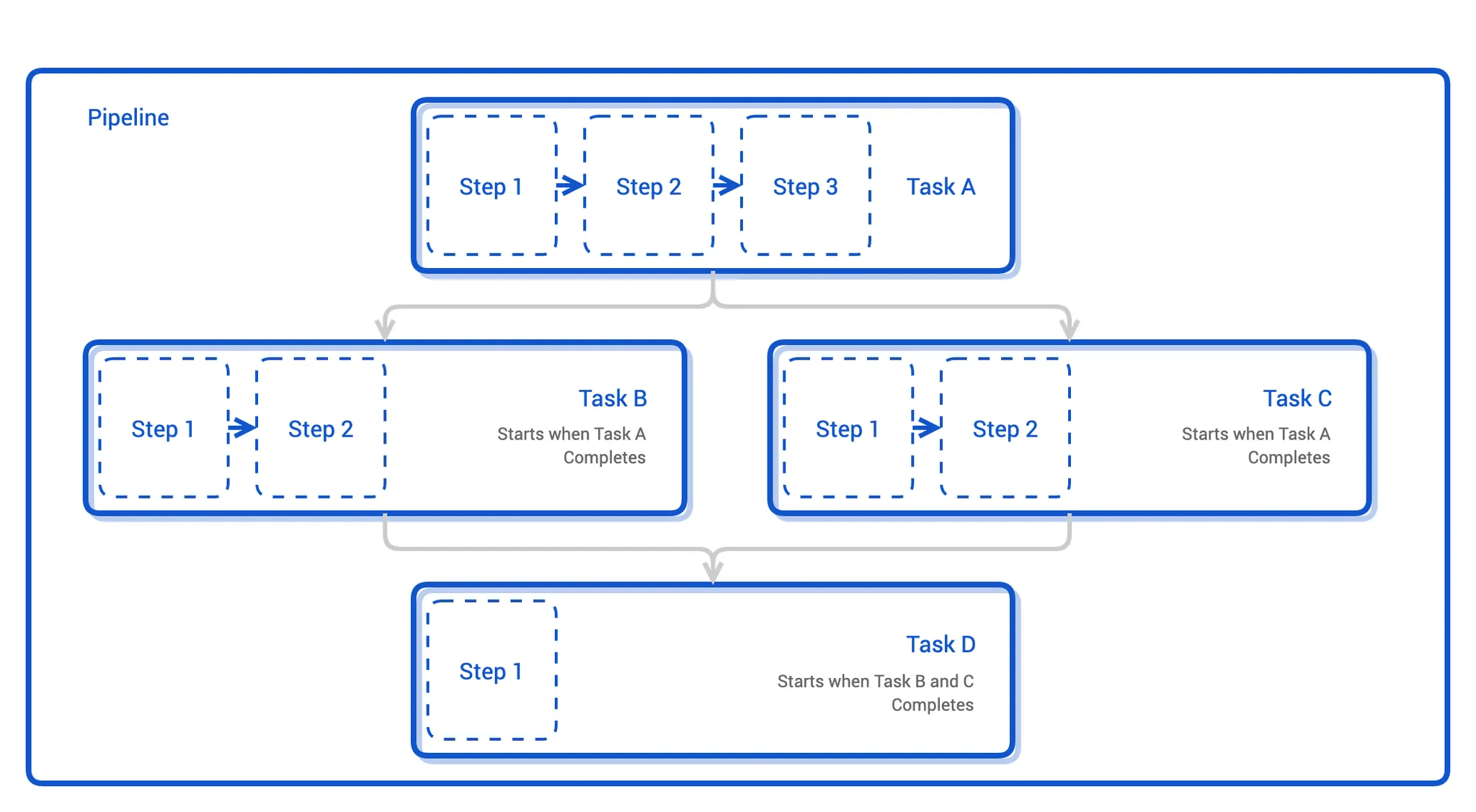
Tekton 은 Jenkins, GitLab CI, Argo Workflows처럼 파이프라인을 선언적으로 정의하고 실행할 수 있는 쿠버네티스 네이티브 CI/CD 엔진입니다.
Tekton 은 쿠버네티스 클러스터 내부에서 동작하며,
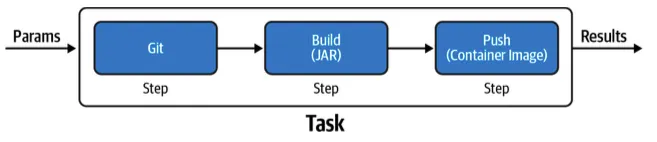
파이프라인의 각 Task 는 Pod 로 실행되고 Task 안의 Step 은 Pod 안의 컨테이너로 수행됩니다.
1.2. 개념
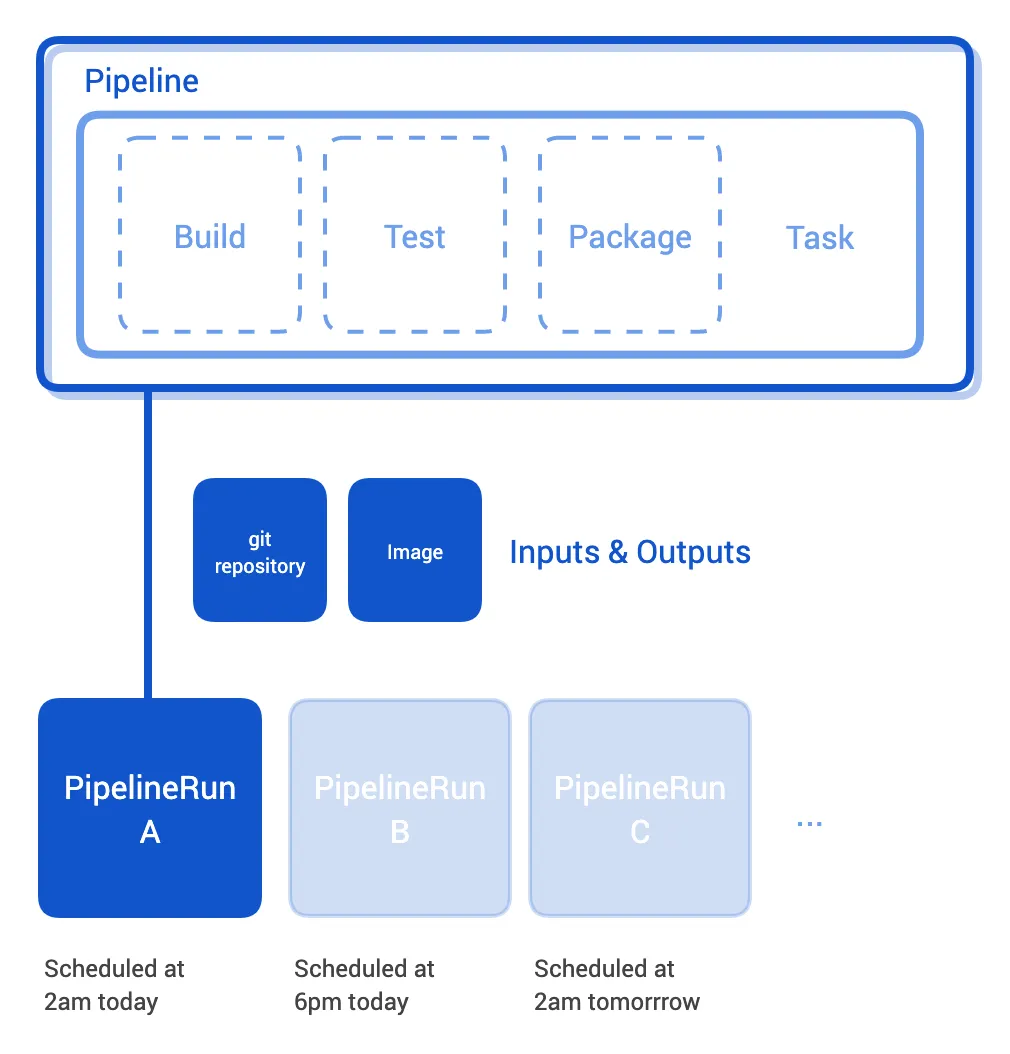
Tekton 은 CI/CD 파이프라인을 쿠버네티스 리소스로 정의하기 때문에 각각의 작업 객체를 CRD 로 정의합니다.
* Task
- Tekton 작업 단위
- CI/CD 에서 하나의 스텝(Build, Test, Deploy 등)에 해당
- Task 는 쿠버네티스 파드로 실행
* Step
- Task 의 세부 실행 단위
- Task(파드)안에서 컨테이너 단위로 실행되는 구체적 명령어
* Pipeline
- 전체 워크플로 단위
- 앱을 빌드 및 또는 배포하는 데 필요한 Task의 목록
- 여러 Task를 순서 또는 조건에 따라 연결한 실행 흐름
* PipelineRun
- 파이프라인 실행 역할
- 파이프라인을 실제로 실행할 때 생성되는 리소스
* TaskRun
- 개별 태스크 실행 역할
- 개별 태스크를 실행할 때 생성되는 리소스
* Workspace
- Task 간 공유 스토리지
- 파이프라인 실행 중 Step, Task 간 파일 공유용 볼륨
* Trigger
- 파이프라인 자동 실행
- Git Push, PR 등의 이벤트 발생 시 동작
Tekton 파이프라인 동작 예시
[Pipeline]
   ├── [Task: Build Image]
   │       ├── [Step: Checkout Code]
   │       └── [Step: Build & Push Image]
   └── [Task: Deploy to Dev]
           ├── [Step: kubectl apply ...]
Tekton 확장 구성 요소
Tekton 은 모듈식 구조로 이루어져 있어, 모든 구성 요소를 개별적으로 또는 한 번에 설치할 수 있습니다.
* Tekton Pipelines
- 기본 파이프라인 엔진
- Task 및 Pipeline 포함
* Tekton Triggers
- Trigger, EventListener 포함
- GitHub, GitLab, HTTP 등 이벤트 트리거
* Tekton Dashboard
- 웹 UI
- 파이프라인과 로그 시각화
* Tekton Chains
- Tekton 파이프라인으로 구축된 아티팩트의 출처를 생성, 저장하고 서명하는 도구를 제공
- 빌드 아티팩트 서명/공급망 보안
* Tekton Catalog
- Tekton 커뮤니티 파이프라인 저장소
- 공용 Task 모음 (예: git-clone, kaniko, maven 등)
* Tekton CLI
- Tekton 객체 관리용 CLI
2. Tekton 실습
2.1. Tekton 설치
Tekton 설치는 앞서 설명했던 것처럼 모듈식 구조로 내가 원하는 구성 요소만 설치할 수 있으며,
여기에서는 Pipeline, Trigger, Dashboard, Tekton CLI 만 설치하겠습니다.
# Tekton dependency 파이프라인(pipeline) 설치 : 현재 v1.5.0
kubectl apply -f https://storage.googleapis.com/tekton-releases/pipeline/latest/release.yaml

# Tekton dependency 파이프라인(pipeline) 설치 확인
kubectl get crd

# Tekton Trigger 설치 : 현재 v0.33.0
kubectl apply -f https://storage.googleapis.com/tekton-releases/triggers/latest/release.yaml
kubectl apply -f https://storage.googleapis.com/tekton-releases/triggers/latest/interceptors.yaml

# Tekton Trigger 설치 확인
kubectl get crd | grep triggers

# Tekton Dashboard 설치 : 현재 v0.62.0
kubectl apply -f https://storage.googleapis.com/tekton-releases/dashboard/latest/release.yaml

# Tekton Dashboard 설치 확인
kubectl get crd | grep dashboard

# Tekton CLI 설치 (mac 전용)
brew install tektoncd-cli

# 설치 확인
tkn version
이후, 대시보드에 접속하기 위해 구성된 쿠버네티스 노드의 포트를 하나 뚫어줍니다.
# service 를 Nodeport 설정 : nodePort 30000
kubectl patch svc -n tekton-pipelines tekton-dashboard -p '{"spec":{"type":"NodePort","ports":[{"port":9097,"targetPort":9097,"nodePort":30000}]}}'

# 포트 포워딩 확인
kubectl get svc,ep -n tekton-pipelines tekton-dashboard

# Tekton 대시보드 접근 (mac 전용)
open http://localhost:30000
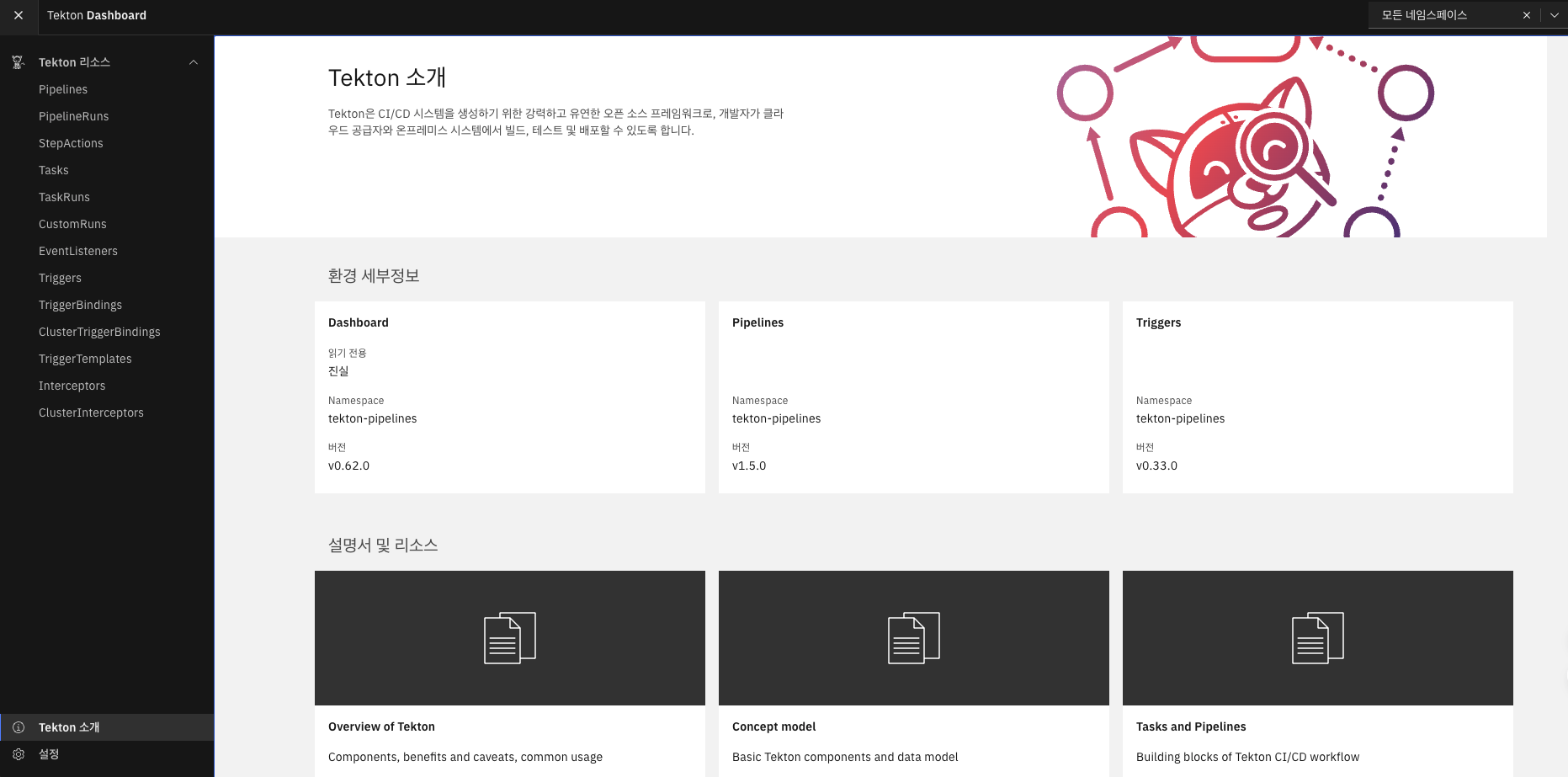
2.2. 단일 Step 의 Task 실행
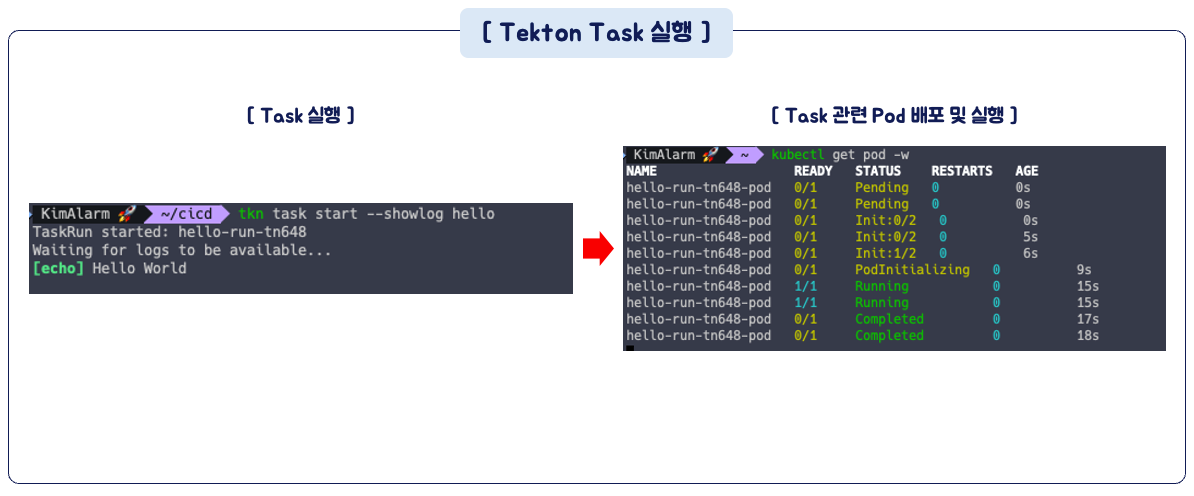
설치된 Tekton 을 사용하기 위해 간단한 Task 를 하나 만들어서 실행해보겠습니다.
Task 는 앞서 설명드렸던 것처럼 실행될 때 쿠버네티스 파드로 실행됩니다.
Task 생성
# task 생성 (Step 이 1개인 태스크)
cat << EOF | kubectl apply -f -
apiVersion: tekton.dev/v1
kind: Task
metadata:
  name: hello
spec:
  steps:
    - name: echo    # step 이름
      image: alpine # step 수행 컨테이너 이미지
      script: |
        #!/bin/sh
        echo "Hello World"
EOF

# 태스크 확인
kubectl get tasks
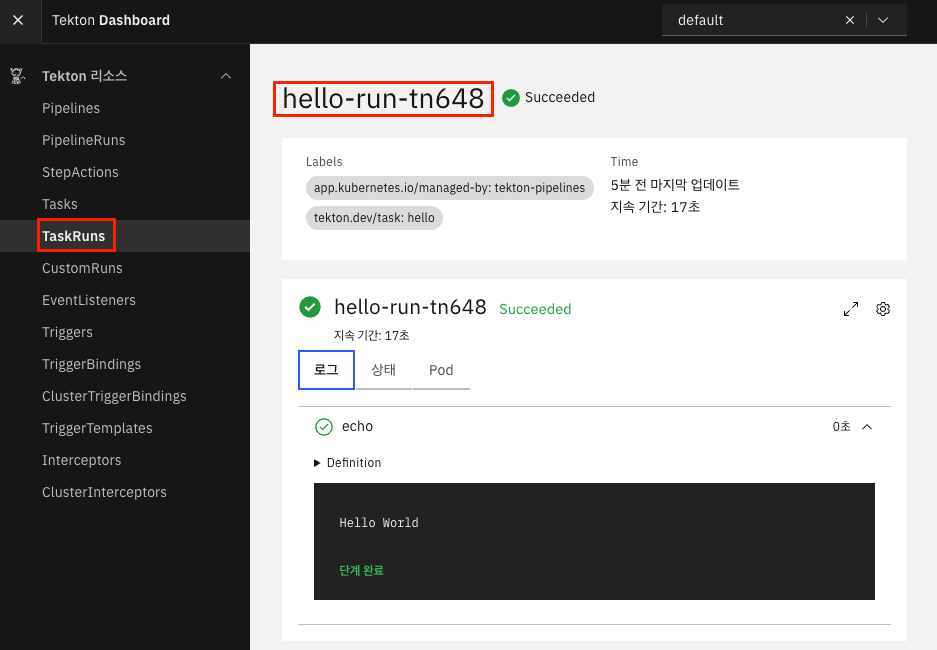
Tekton 대시보드 화면
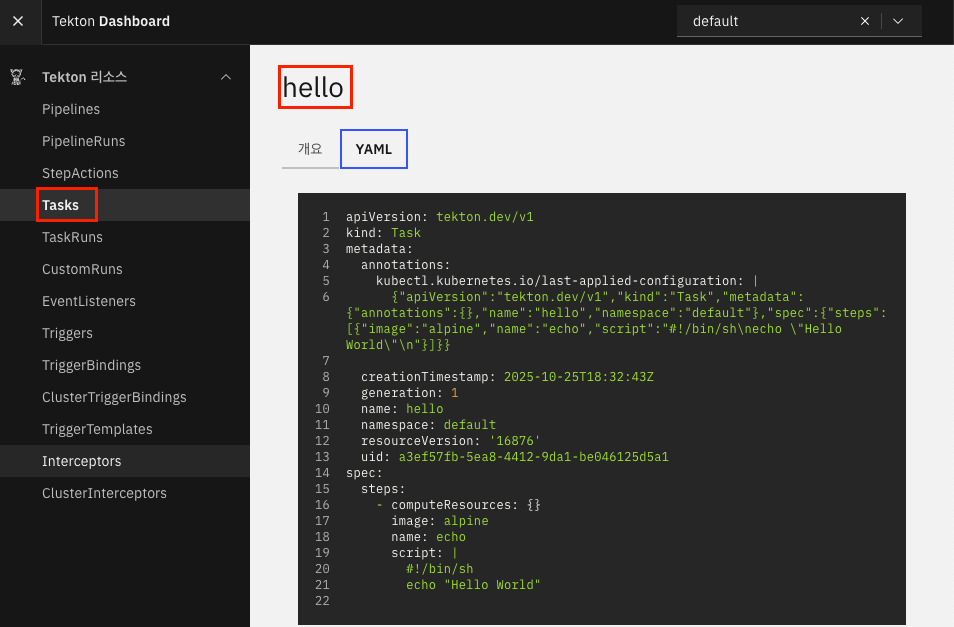
Task 실행
# tkn CLI로 task 시작
tkn task start --showlog hello
- Tekton 대시보드 TaskRun 화면
2.3. 멀티 Step 의 Task 실행
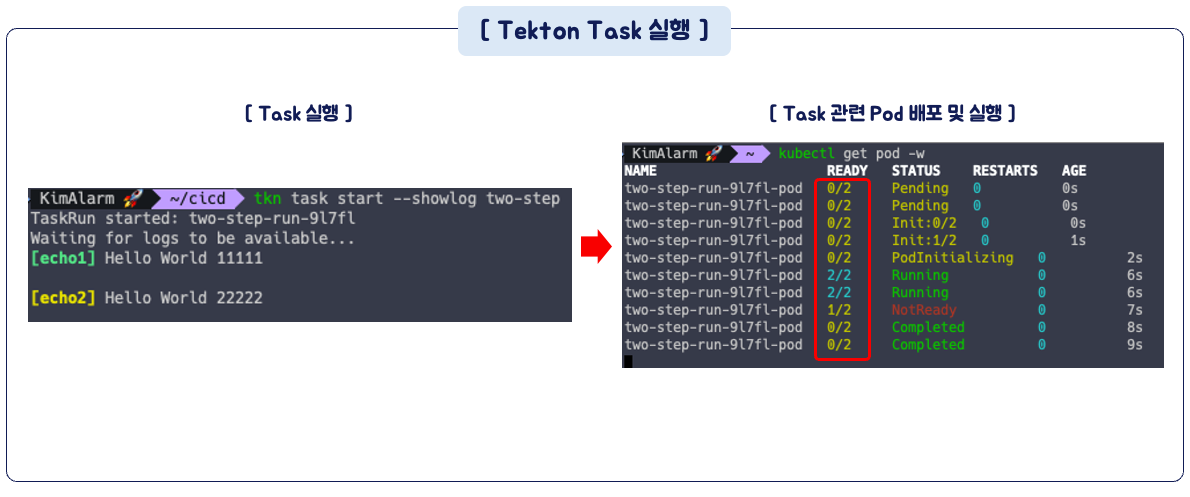
Task 는 파드 단위로 구성되며, Task 의 Step 은 컨테이너 단위로 구성된다고 말했습니다.
이번에는 2개의 Step 을 가진 Task 를 실행해보겠습니다.
# task 생성
cat << EOF | kubectl apply -f -
apiVersion: tekton.dev/v1
kind: Task
metadata:
  name: two-step
spec:
  steps:
    - name: echo1
      image: alpine
      script: |
        #!/bin/sh
        echo "Hello World 11111"
    - name: echo2
      image: alpine
      script: |
        #!/bin/sh
        echo "Hello World 22222"
EOF

# Task 실행
tkn task start --showlog two-step
2.5. Public Git 저장소 사용
이번에는 Github 에 저장된 소스코드를 가져와서 파이프라인을 실행해보겠습니다.
이번 파이프라인에서는 Input, Output 에 대한 개념이 필요합니다.
* Input
- 해당 Task 가 소비하는 ingested 리소스
- 이전 Task 로부터 전달 받음
* Ouput
- 해당 Task 가 생산하는 produced 리소스
- 다음 Task 에 전달
* Params
- Task 의 Step 에서 사용되는 인자
- name: 인자의 이름
- description: 인자에 대한 설명
- default: 인자 기본값
- results: Task 실행 결과에 대한 이름
- workspaces: Task 간 공유 볼륨 경로
- volumes: Task 에 마운트될 외부 볼륨
파이프라인 생성
해당 파이프라인의 Task 에서는 git-clone Task 를 참조하는 구문이 있는 것에 주의해주세요.
# 파이프라인 파일 작성
cat << EOF | kubectl apply -f -
apiVersion: tekton.dev/v1
kind: Pipeline
metadata:
  name: clone-read
spec:
  description: |
    This pipeline clones a git repo, then echoes the README file to the stout.
  params:     # 매개변수 repo-url
  - name: repo-url
    type: string
    description: The git repo URL to clone from.
  workspaces: # 다운로드할 코드를 저장할 공유 볼륨인 작업 공간을 추가
  - name: shared-data
    description: |
      This workspace contains the cloned repo files, so they can be read by the
      next task.
  tasks:      # task 정의
  - name: fetch-source
    taskRef:
      name: git-clone
    workspaces:
    - name: output
      workspace: shared-data
    params:
    - name: url
      value: \$(params.repo-url)
EOF

# 확인
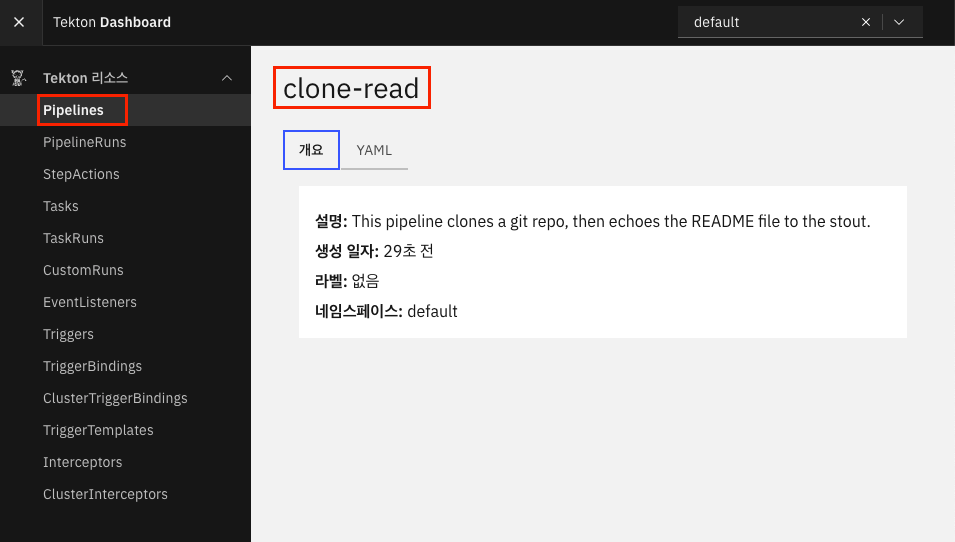
kubectl get pipeline
Git Clone 을 위한 Task 생성
# Tekton 허브에서 설치
tkn hub install task git-clone

# Task 확인
kubectl get tasks
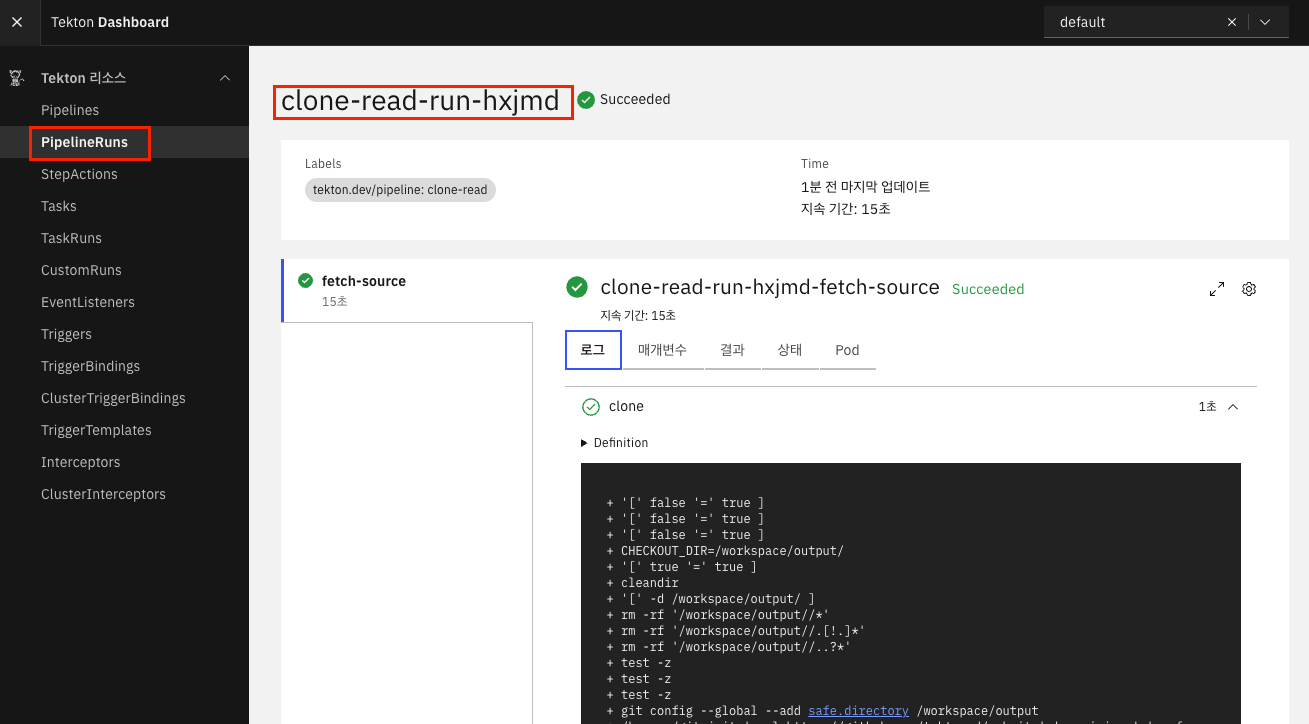
파이프라인 실행 (PieplineRun)
cat << EOF | kubectl create -f -
apiVersion: tekton.dev/v1
kind: PipelineRun
metadata:
  generateName: clone-read-run-
spec:
  pipelineRef:
    name: clone-read
  taskRunTemplate:
    podTemplate:
      securityContext:
        fsGroup: 65532
  workspaces:
  - name: shared-data
    volumeClaimTemplate:
      spec:
        accessModes:
        - ReadWriteOnce
        resources:
          requests:
            storage: 1Gi
  params:
  - name: repo-url
    value: https://github.com/tektoncd/website
EOF

# pv,pvc 확인
kubectl get pod,pv,pvc
2.6. Private Git 저장소 사용
대다수의 경우에는 Private Git 저장소를 사용할 것입니다.
Tekton 에서 Private Git 저장소에 접근하기 위해서는 쿠버네티스 Secret 을 통해서 인증키를 저장한 후,
해당 Secret 을 Tekton ServiceAccount 에 적용하여 권한을 부여하면 됩니다.
실습을 위해 Private Github 저장소가 필요하며 SSH 키 접근방식을 사용하기 위해 사전에 키를 적용했습니다.
# ssh 키 등록 확인
ssh -i ~/.ssh/id_ed25519 -T git@github.com

# 본인의 Git 저장소 등록
git remote set-url origin git@github.com:<your-username>/my-sample-app.git

# 테스트용 파일 생성
echo 'cicd study' > readme.md
git add .
git commit -m "add readme.md file"
git push -u origin main

# Git 인증용 SSH 사설키를 base64 인코딩
SSHPK=$(cat ~/.ssh/id_ed25519 | base64 -w0)

# Git 인증서버 known_hosts 값을 base64 인코딩
cat ~/.ssh/known_hosts | grep github
SSHKH=$(ssh-keyscan github.com | grep ecdsa-sha2-nistp256 | base64 -w0)
echo $SSHKH


시크릿 배포
# 시크릿 배포
cat << EOF | kubectl apply -f -
apiVersion: v1
kind: Secret
metadata:
  name: git-credentials
data:
  id_rsa: $SSHPK
  known_hosts: $SSHKH
EOF

# 확인
kubectl get secret

# ServiceAccount 에 Secret 속성 지정
cat << EOF | kubectl apply -f -
apiVersion: v1
kind: ServiceAccount
metadata:
  name: build-bot
secrets:
  - name: git-credentials
EOF

# 확인
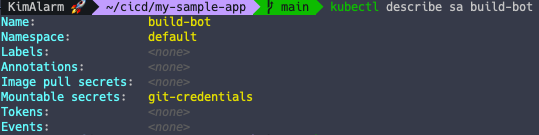
kubectl get sa
kubectl describe sa build-bot
파이프라인 배포
# 파이프라인 파일 작성
cat << EOF | kubectl apply -f -
apiVersion: tekton.dev/v1
kind: Pipeline
metadata:
  name: my-clone-read
spec:
  description: |
    This pipeline clones a git repo, then echoes the README file to the stout.
  params:     # 매개변수 repo-url
  - name: repo-url
    type: string
    description: The git repo URL to clone from.
  workspaces: # 다운로드할 코드를 저장할 공유 볼륨인 작업 공간을 추가
  - name: shared-data
    description: |
      This workspace contains the cloned repo files, so they can be read by the
      next task.
  - name: git-credentials
    description: My ssh credentials
  tasks:      # task 정의
  - name: fetch-source
    taskRef:
      name: git-clone
    workspaces:
    - name: output
      workspace: shared-data
    - name: ssh-directory
      workspace: git-credentials
    params:
    - name: url
      value: \$(params.repo-url)
  - name: show-readme # add task
    runAfter: ["fetch-source"]
    taskRef:
      name: show-readme
    workspaces:
    - name: source
      workspace: shared-data
EOF

# 확인
kubectl get pipeline


# show-readme task 배포
cat << EOF | kubectl apply -f -
apiVersion: tekton.dev/v1
kind: Task
metadata:
  name: show-readme
spec:
  description: Read and display README file.
  workspaces:
  - name: source
  steps:
  - name: read
    image: alpine:latest
    script: |
      #!/usr/bin/env sh
      cat \$(workspaces.source.path)/readme.md
EOF

# 파이프라인 실행
cat << EOF | kubectl create -f -
apiVersion: tekton.dev/v1
kind: PipelineRun
metadata:
  generateName: clone-read-run-
spec:
  pipelineRef:
    name: my-clone-read
  taskRunTemplate:
    serviceAccountName: build-bot
    podTemplate:
      securityContext:
        fsGroup: 65532
  workspaces:
  - name: shared-data
    volumeClaimTemplate:
      spec:
        accessModes:
        - ReadWriteOnce
        resources:
          requests:
            storage: 1Gi
  - name: git-credentials
    secret:
      secretName: git-credentials
  params:
  - name: repo-url
    value: git@github.com:AlarmKimKB/my-sample-app.git # 본인 Git 저장소
EOF
잘 수행이 되어서 readme.md 파일 내용이 출력된 것을 확인할 수 있었습니다.
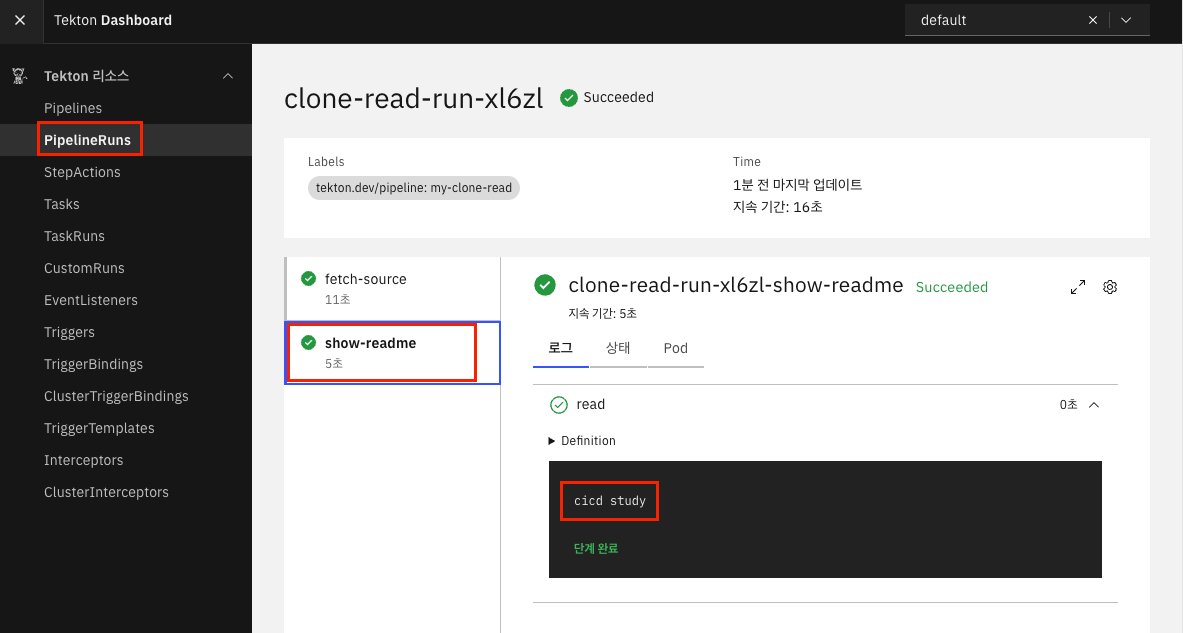
또한, Task 가 2개이므로 파드 또한 2개인 것을 확인했습니다.

2.7. Tekton 을 사용한 컨테이너 빌드 및 푸시
Tekton Task 를 사용한 앱 컴파일, 패키징, 이미지 생성까지의 과정을 실습해보겠습니다.
Kaniko Task 설치
이미지 빌드는 Kaniko 를 활용할 예정입니다.
# task 설치 : https://hub.tekton.dev/tekton/task/kaniko
tkn hub install task kaniko

# 확인
kubectl get tasks
실습을 위한 Docker 자격증명 Secret 등록
Dockerhub 에 이미지를 푸시할 것인데, 푸시할 수 있는 권한이 필요합니다.
해당 권한도 쿠버네티스 시크릿을 통해서 등록할 수 있습니다.
# Docker credential helper 설치
brew install docker-credential-helper

# Mac 사용자
echo "https://index.docker.io/v1/" | docker-credential-osxkeychain get | jq

# 출력된 값에서 Username, Secret 항목을 추출
{
  "ServerURL": "https://index.docker.io/v1/",
  "Username": "kim*****",
  "Secret": "*********"
}

# 시크릿 생성을 위해 Base64 인코딩
echo -n "{USERNAME_값}:{SECRET_값}" | base64

# 임시 파일 생성
vim dsh.txt
{
  "auths": {
    "https://index.docker.io/v1/": {
      "auth": "{BASE64 인코딩 값 저장}"
    }
  }
}

# dsh.txt 파일 내용을 다시 base64 적용
DSH=$(cat dsh.txt | base64 -w0)
echo $DSH

# 시크릿 생성
cat << EOF | kubectl apply -f -
apiVersion: v1
kind: Secret
metadata:
  name: docker-credentials
data:
  config.json: $DSH
EOF

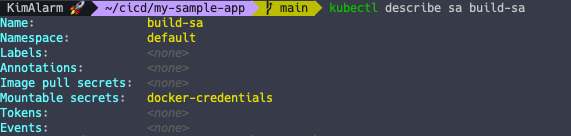
# 서비스 어카운트 생성
kubectl create sa build-sa
kubectl patch sa build-sa -p '{"secrets": [{"name": "docker-credentials"}]}'
kubectl describe sa build-sa
파이프라인 실행
cat << EOF | kubectl apply -f -
apiVersion: tekton.dev/v1
kind: Pipeline
metadata:
  name: clone-build-push
spec:
  description: |
    This pipeline clones a git repo, builds a Docker image with Kaniko and pushes it to a registry
  params:
  - name: repo-url
    type: string
  - name: image-reference
    type: string
  workspaces:
  - name: shared-data
  - name: docker-credentials
  tasks:
  - name: fetch-source
    taskRef:
      name: git-clone
    workspaces:
    - name: output
      workspace: shared-data
    params:
    - name: url
      value: \$(params.repo-url)
  - name: build-push
    runAfter: ["fetch-source"]
    taskRef:
      name: kaniko
    workspaces:
    - name: source
      workspace: shared-data
    - name: dockerconfig
      workspace: docker-credentials
    params:
    - name: IMAGE
      value: \$(params.image-reference)
EOF

# 파이프라인 실행
cat << EOF | kubectl create -f -
apiVersion: tekton.dev/v1
kind: PipelineRun
metadata:
  generateName: clone-build-push-run-
spec:
  pipelineRef:
    name: clone-build-push
  taskRunTemplate:
    serviceAccountName: build-sa
    podTemplate:
      securityContext:
        fsGroup: 65532
  workspaces:
  - name: shared-data
    volumeClaimTemplate:
      spec:
        accessModes:
        - ReadWriteOnce
        resources:
          requests:
            storage: 1Gi
  - name: docker-credentials
    secret:
      secretName: docker-credentials
  params:
  - name: repo-url
    value: https://github.com/gasida/docsy-example.git
  - name: image-reference
    value: docker.io/kimalarm2/docsy:1.0.0
EOF
그러나 실제 수행에는 실패했습니다.
중간 Dockerhub 인증 쪽에서 단계가 잘못 수행된 것 같은데 해결되진 않았습니다. ㅠㅠ
