CICD
[CI/CD Study 8주차] Vault Production - HA, LDAP, SSL/TLS
CoudNet@ 팀의 가시다님께서 리딩하시는 CI/CD Study 8주차 스터디 내용 정리
이번 주차는 스터디의 마지막 8주차로 Vault 에 대해 더 자세히 배운 시간이었습니다.
이번 글은 이번 스터디의 마지막 글로 Vault 를 Production 레벨 (운영) 에서 활용할 때 알아야 할 기초 내용에 대해서 학습했습니다.
1. Vault HA
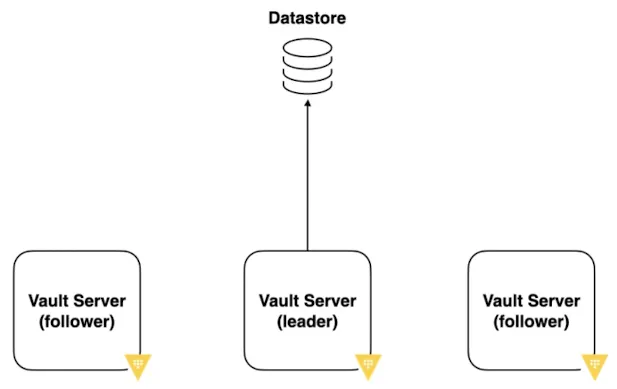
Vault HA (High Availability) 는 Vault 서버가 장애 없이 계속 서비스를 제공하도록 구성하는 방식
1.1. 핵심 개념
* Active / Standby 구조 (최소 Active 1 + Standby 2)
- Active(Lead) : 실제 요청 처리
- Standby(Follower) : 대기 상태
- Active 장애 발생 시, Standby 중 하나가 자동 승격
- 클라이언트는 항상 하나의 Vault 주소만 바라봄 (Active)
1.2. 부가 개념
* Seal / Unseal
- 모든 Vault 노드는 Unseal 상태여야 동작 가능
- HA 일 때에도 Unseal 은 노드별 수행 필요
2. Vault HA 설치
2.1. Kind 설치
kind create cluster --name myk8s --image kindest/node:v1.32.8 --config - <<EOF
kind: Cluster
apiVersion: kind.x-k8s.io/v1alpha4
nodes:
- role: control-plane
  labels:
    ingress-ready: true
  extraPortMappings:
  - containerPort: 80
    hostPort: 80
    protocol: TCP
  - containerPort: 443
    hostPort: 443
    protocol: TCP
  - containerPort: 30000
    hostPort: 30000
  - containerPort: 30001
    hostPort: 30001
- role: worker
- role: worker
- role: worker
EOF
2.2. Vault HA 배포
# NS 배포
kubectl create ns vault

# HA vaules 생성

cat << EOF > values-ha.yaml
server:
  replicas: 3

  # Vault HA mode
  ha:
    enabled: true
    replicas: 3
    raft:
      enabled: true
    config: |
      ui = true
      listener "tcp" {
        tls_disable = 1                           # TLS 바활성화
        address = "[::]:8200"                     # 모든 IPv6 주소에서 8200 포트 수신
        cluster_address = "[::]:8201"             # 클러스터 통신 포트
      }

      service_registration "kubernetes" {}        # Kubernetes 서비스 등록 활성화

  readinessProbe:
    enabled: true

  # PVC for Raft storage
  dataStorage:
    enabled: true
    size: 10Gi

  service:
    enabled: true
    type: ClusterIP
    port: 8200
    targetPort: 8200

ui:
  enabled: true
  serviceType: "NodePort"
  externalPort: 8200
  serviceNodePort: 30000

injector:
  enabled: false
EOF

# Vault 배포
helm install vault hashicorp/vault -n vault -f values-ha.yaml --version 0.31.0

# Pod 확인
kubectl get pods --selector='app.kubernetes.io/name=vault' -n vault

'''
NAME      READY   STATUS    RESTARTS   AGE
vault-0   0/1     Running   0          79s
vault-1   0/1     Running   0          79s
vault-2   0/1     Running   0          79s
'''
2.3. Vault Unseal - 첫번째 파드
Production 레벨에서는 Vault 배포 후 Unseal 을 하지 않으면 Vault 를 사용할 수 없습니다.
# 첫번째 파드 접근
kubectl exec -it vault-0 -n vault -- sh

# Init 실행
vault operator init

'''
Unseal Key 1: ZqCrmmi+4vw5A1lAINIs1nA6/8SkyITLobzK1ONXU2Jc
Unseal Key 2: cQBJI9QK+jFtm6megvrReINEjCj7Y9bmtdBU1CCqyhqW
Unseal Key 3: m3tK7Agew01h+pd/ysCO5g2n3bwm9IJljNdk0es3DaEa
Unseal Key 4: 2KlM6gG1N2RoVTT6t4BIYU3nh7YYmBNC3wkJ85Ukl3ny
Unseal Key 5: NNZqzvTfCCqhiFqCG25mFfKoG/mJcB+m5wVEvwP+tfPg

Initial Root Token: hvs.bQwXGUkKgVcxnkw2SbwhA7Mc
'''

# Unseal 을 각각 다른 키로 3번 실행하여 봉인 해제
vault operator unseal

첫번째 파드를 해제 했음에도 2개의 파드는 아직 동작이 안되고 있습니다.
이는 2개의 파드 모두 각각 Unseal 과정을 거쳐야 함을 의미합니다.

2.4. Vault Unseal - 나머지 파드
# 각각의 Pod 에서 HA 를 위해 Vault Join 실행 (1 Active + 2 Standby)
kubectl exec -n vault -it vault-1 -- vault operator raft join http://vault-0.vault-internal:8200
kubectl exec -n vault -it vault-2 -- vault operator raft join http://vault-0.vault-internal:8200

# 각각의 파드에서 Unseal 3번 수행
kubectl exec -it vault-1 -n vault -- sh
vault operator unseal

kubectl exec -it vault-2 -n vault -- sh
vault operator unseal
2.5. Vault 추가 설정
# 실습을 위해 Vault CLI 로그인
export VAULT_ROOT_TOKEN=hvs.bQwXGUkKgVcxnkw2SbwhA7Mc
export VAULT_ADDR='http://localhost:30000'

# Vault 로그인
vault login
'''
Token (will be hidden):
Success! You are now authenticated. The token information displayed below
is already stored in the token helper. You do NOT need to run "vault login"
again. Future Vault requests will automatically use this token.

Key                  Value
---                  -----
token                hvs.bQwXGUkKgVcxnkw2SbwhA7Mc
token_accessor       itvosXVwvwQdS6VXCxVck7qv
token_duration       ∞
token_renewable      false
token_policies       ["root"]
identity_policies    []
policies             ["root"]
'''

# Vault 상태 확인
vault operator raft list-peers

'''
Node                                    Address                        State       Voter
----                                    -------                        -----       -----
97cb915c-5273-1592-e126-89d38d4f2f53    vault-0.vault-internal:8201    leader      true
7cbe7eb1-c221-f254-a45e-8362b77ed8cc    vault-1.vault-internal:8201    follower    true
d3574cd2-a84f-9b63-8b06-85a092b0ca68    vault-2.vault-internal:8201    follower    true
'''

## 실습용 Vault 시크릿 생성
vault secrets enable -path=mysecret kv-v2

vault kv put mysecret/logins/study \
  username="demo" \
  password="p@ssw0rd"

vault kv get mysecret/logins/study
3. Vault + LDAP
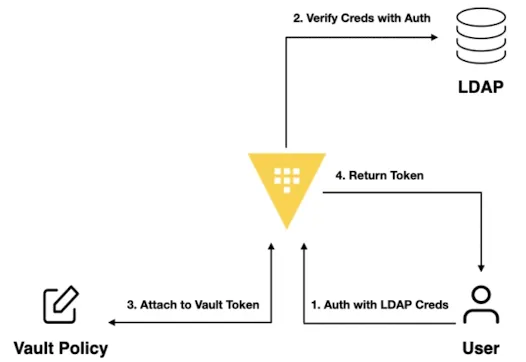
3.1. OpenLDAP 배포
cat <<EOF | kubectl apply -f -
apiVersion: v1
kind: Namespace
metadata:
  name: openldap
---
apiVersion: apps/v1
kind: Deployment
metadata:
  name: openldap
  namespace: openldap
spec:
  replicas: 1
  selector:
    matchLabels:
      app: openldap
  template:
    metadata:
      labels:
        app: openldap
    spec:
      containers:
        - name: openldap
          image: osixia/openldap:1.5.0
          ports:
            - containerPort: 389
              name: ldap
            - containerPort: 636
              name: ldaps
          env:
            - name: LDAP_ORGANISATION    # 기관명, LDAP 기본 정보 생성 시 사용
              value: "Example Org"
            - name: LDAP_DOMAIN          # LDAP 기본 Base DN 을 자동 생성
              value: "example.org"
            - name: LDAP_ADMIN_PASSWORD  # LDAP 관리자 패스워드
              value: "admin"
            - name: LDAP_CONFIG_PASSWORD
              value: "admin"
        - name: phpldapadmin
          image: osixia/phpldapadmin:0.9.0
          ports:
            - containerPort: 80
              name: phpldapadmin
          env:
            - name: PHPLDAPADMIN_HTTPS
              value: "false"
            - name: PHPLDAPADMIN_LDAP_HOSTS
              value: "openldap"   # LDAP hostname inside cluster
---
apiVersion: v1
kind: Service
metadata:
  name: openldap
  namespace: openldap
spec:
  selector:
    app: openldap
  ports:
    - name: phpldapadmin
      port: 80
      targetPort: 80
      nodePort: 30001
    - name: ldap
      port: 389
      targetPort: 389
    - name: ldaps
      port: 636
      targetPort: 636
  type: NodePort
EOF

# LDAP 로그인 정보
Bind DN: cn=admin,dc=example,dc=org
Password: admin
3.2. OpenLDAP 설정
# LDAP 서버 접근
kubectl -n openldap exec -it deploy/openldap -c openldap -- bash

# LDAP OU 배포
cat <<EOF | ldapadd -x -D "cn=admin,dc=example,dc=org" -w admin
dn: ou=people,dc=example,dc=org
objectClass: organizationalUnit
ou: people

dn: ou=groups,dc=example,dc=org
objectClass: organizationalUnit
ou: groups
EOF

# LDAP User 추가
cat <<EOF | ldapadd -x -D "cn=admin,dc=example,dc=org" -w admin
dn: uid=alice,ou=people,dc=example,dc=org
objectClass: inetOrgPerson
cn: Alice
sn: Kim
uid: alice
mail: alice@example.org
userPassword: alice123

dn: uid=bob,ou=people,dc=example,dc=org
objectClass: inetOrgPerson
cn: Bob
sn: Lee
uid: bob
mail: bob@example.org
userPassword: bob123
EOF

# LDAP Group 추가
cat <<EOF | ldapadd -x -D "cn=admin,dc=example,dc=org" -w admin
dn: cn=devs,ou=groups,dc=example,dc=org
objectClass: groupOfNames
cn: devs
member: uid=bob,ou=people,dc=example,dc=org

dn: cn=admins,ou=groups,dc=example,dc=org
objectClass: groupOfNames
cn: admins
member: uid=alice,ou=people,dc=example,dc=org
EOF

#
exit
3.3. LDAP 연동
# LDAP 인증 활성화
vault auth enable ldap

# LDAP 구성
vault write auth/ldap/config \
    url="ldap://openldap.openldap.svc:389" \
    starttls=false \
    insecure_tls=true \
    binddn="cn=admin,dc=example,dc=org" \
    bindpass="admin" \
    userdn="ou=people,dc=example,dc=org" \
    groupdn="ou=groups,dc=example,dc=org" \
    groupfilter="(member=uid={{.Username}},ou=people,dc=example,dc=org)" \
    groupattr="cn"

# LDAP 인증 테스트 - Password: alice123
vault login -method=ldap username=alice

'''
Password (will be hidden):
Success! You are now authenticated. The token information displayed below
is already stored in the token helper. You do NOT need to run "vault login"
again. Future Vault requests will automatically use this token.

Key                    Value
---                    -----
token                  hvs.CAESICkPZ_AZNnQ0oIw2cLDUQfqk1d9kDfwMqe3JpbFgk4bnGh4KHGh2cy52ZUhkcHNsdkc1c2dpbEUwUFdLU1VpYkI
token_accessor         yPZefdU4ThHjlOrAgOKDYCUX
token_duration         768h
token_renewable        true
token_policies         ["default"]
identity_policies      []
policies               ["default"]
token_meta_username    alice
'''
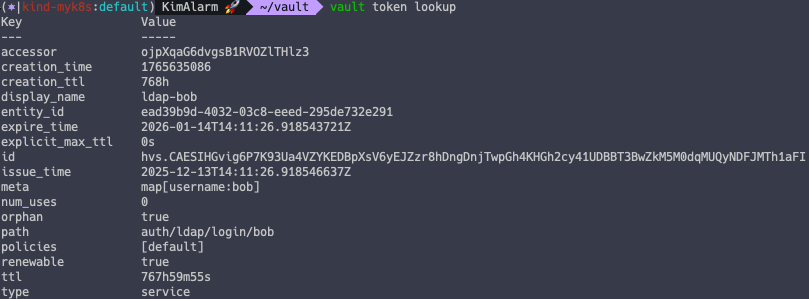
3.4. LDAP 그룹 연동
# Vault Root 계정으로 실행 필요

# Vault Policy 생성
vault policy write admin - <<EOF
path "*" {
capabilities = ["create", "read", "update", "delete", "list", "sudo"]
}
EOF

# LDAP Group 에 Vault Policy 연동
vault write auth/ldap/groups/admins policies=admin

# LDAP 유저로 로그인
vault login -method=ldap username=alice password=alice123

# 정책 적용 확인 - admin read 권한
vault policy read admin
4. Vault Server TLS
Vault 서버를 HTTPS 로 구성하는 방법입니다.
4.1. kind 배포
# 기존 kind 삭제 - 기존에 배포되어 있을 경우
kind delete cluster --name myk8s

# Kind 배포
kind create cluster --name myk8s --image kindest/node:v1.32.8 --config - <<EOF
kind: Cluster
apiVersion: kind.x-k8s.io/v1alpha4
nodes:
- role: control-plane
  labels:
    ingress-ready: true
  extraPortMappings:
  - containerPort: 80
    hostPort: 80
    protocol: TCP
  - containerPort: 443
    hostPort: 443
    protocol: TCP
  - containerPort: 30000
    hostPort: 30000
EOF
4.2. Ingress Nginx 배포
# Ingress Nginx 배포
kubectl apply -f https://raw.githubusercontent.com/kubernetes/ingress-nginx/main/deploy/static/provider/kind/deploy.yaml

# SSL Passthrough 활성화
kubectl patch deployment ingress-nginx-controller \
  -n ingress-nginx \
  --type='json' \
  -p='[
    {
      "op": "add",
      "path": "/spec/template/spec/containers/0/args/-",
      "value": "--enable-ssl-passthrough"
    }
  ]'

# NodeSelector 지정
kubectl patch deployment ingress-nginx-controller -n ingress-nginx \
  --type='merge' \
  -p='{
    "spec": {
      "template": {
        "spec": {
          "nodeSelector": {
            "ingress-ready": "true"
          }
        }
      }
    }
  }'
4.3. Vault 배포
Helm Version 4 배포 시 오류 발생 가능성이 있어 안전하게 Control Plane 노드에 Helm v3 설치 후 진행했습니다.
# Control Plane 접속
docker exec -it myk8s-control-plane bash

# Helm 설치
curl https://raw.githubusercontent.com/helm/helm/main/scripts/get-helm-3 | bash
helm repo add hashicorp https://helm.releases.hashicorp.com
helm repo update

# CA 생성
mkdir /tls && cd /tls

openssl genrsa -out ca.key 2048
openssl req -x509 -new -nodes \
  -key ca.key \
  -subj "/CN=Vault-CA" \
  -days 3650 \
  -out ca.crt

# Vault 서버 인증서 생성
openssl genrsa -out vault.key 2048
openssl req -new -key vault.key \
  -subj "/CN=vault.example.com" \
  -out vault.csr

# 인증서 서명
openssl x509 -req \
  -in vault.csr \
  -CA ca.crt \
  -CAkey ca.key \
  -CAcreateserial \
  -out vault.crt \
  -days 3650 \
  -extensions v3_req \
  -extfile <(cat <<EOF
[v3_req]
subjectAltName = @alt_names
[alt_names]
DNS.1 = vault.example.com
DNS.2 = vault
DNS.3 = localhost
DNS.4 = vault.vault.svc.cluster.local
DNS.5 = vault.vault-internal
DNS.6 = vault-0.vault-internal
DNS.7 = vault-1.vault-internal
DNS.8 = vault-2.vault-internal
DNS.9 = 127.0.0.1
EOF
)

# Kubernetes TLS Secret 등록
kubectl create namespace vault
kubectl -n vault create secret tls vault-tls \
  --cert=vault.crt \
  --key=vault.key

# CA도 저장 (init 과정에 사용)
kubectl -n vault create secret generic vault-ca \
  --from-file=ca.crt=ca.crt

# TLS 설정이 적용된 Vault 배포
cat << EOF > values-tls.yaml
global:
  tlsDisable: false

injector:
  enabled: false

server:
  volumes:
    - name: vault-tls
      secret:
        secretName: vault-tls
    - name: vault-ca
      secret:
        secretName: vault-ca
  volumeMounts:
    - name: vault-tls
      mountPath: /vault/user-tls
      readOnly: true
    - name: vault-ca
      mountPath: /vault/user-ca
      readOnly: true

  # Vault HTTPS listener 설정
  standalone:
    enabled: "true"
    config: |-
      ui = true
      listener "tcp" {
        tls_disable = 0
        address = "0.0.0.0:8200"
        cluster_address = "0.0.0.0:8201"
        tls_cert_file    = "/vault/user-tls/tls.crt"
        tls_key_file     = "/vault/user-tls/tls.key"
      }
      storage "file" {
        path = "/vault/data"
      }
      api_addr     = "https://vault.vault.svc.cluster.local:8200"
      cluster_addr = "https://vault-0.vault-internal:8201"
EOF

# Vault 배포
helm install vault hashicorp/vault -n vault -f values-tls.yaml --version 0.29.0

exit
4.4. Vault 활성화
Unseal 상태이므로 봉인을 해제해줍니다.
# Vault Key 확인
kubectl exec vault-0 -n vault -- vault operator init -tls-skip-verify \
    -key-shares=1 \
    -key-threshold=1 \
    -format=json > cluster-keys.json

# Unseal
VAULT_UNSEAL_KEY=$(jq -r ".unseal_keys_b64[]" cluster-keys.json)
kubectl exec vault-0 -n vault -- vault operator unseal -tls-skip-verify $VAULT_UNSEAL_KEY

# Pod 상태 확인 - Unseal 일 경우 1/1
kubectl get pod -n vault

'''
NAME      READY   STATUS    RESTARTS   AGE
vault-0   1/1     Running   0          5m34s
'''

# Vault Login - HTTPS (SSL/TLS 활용)
kubectl patch svc -n vault vault -p '{"spec":{"type":"NodePort","ports":[{"port":8200,"targetPort":8200,"nodePort":30000}]}}'
export VAULT_ADDR='https://localhost:30000'

vault login -tls-skip-verify
4.5. Ingress 배포
# 로컬 PC 에서 도메인 테스트를 위해 PC 호스트파일 수정
echo "127.0.0.1 vault.example.com" | sudo tee -a /etc/hosts

# Ingress 배포

cat <<EOF | kubectl apply -f -
apiVersion: networking.k8s.io/v1
kind: Ingress
metadata:
  name: vault-https
  namespace: vault
  annotations:
    nginx.ingress.kubernetes.io/ssl-passthrough: "true"
    nginx.ingress.kubernetes.io/backend-protocol: "HTTPS"
    nginx.ingress.kubernetes.io/force-ssl-redirect: "true"
spec:
  ingressClassName: "nginx"
  rules:
    - host: vault.example.com
      http:
        paths:
          - path: /
            pathType: Prefix
            backend:
              service:
                name: vault
                port:
                  number: 8200
  tls:
    - hosts:
        - vault.example.com
      secretName: vault-tls
EOF

# Ingress 확인
kubectl get ingress -n vault -w

'''
NAME          CLASS   HOSTS               ADDRESS   PORTS     AGE
vault-https   nginx   vault.example.com             80, 443   3s
vault-https   nginx   vault.example.com   localhost   80, 443   31s
'''

# 도메인 접근
open "https://vault.example.com"
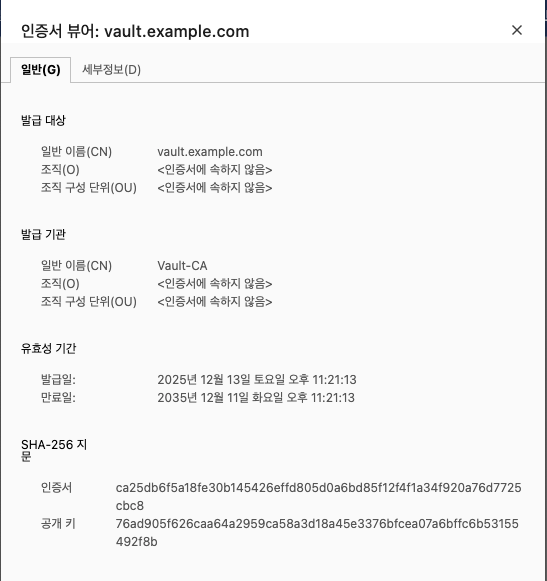
'CICD' 카테고리의 다른 글
| [CI/CD Study 8주차] Vault on K8S (0) | 2025.12.13 |
|---|---|
| [CI/CD Study 7주차] Vault 개요 - Vault Agent, Transit 엔진 (1) | 2025.11.30 |
| [CI/CD Study 6주차] ArgoCD 실전 활용 - App of Apps, ApplicationSet, 인증 통합 (1) | 2025.11.23 |
| [CI/CD Study 5주차] Argo Rollout (0) | 2025.11.16 |
| [CI/CD Study 5주차] ArgoCD SSO - Keycloak (0) | 2025.11.16 |
Contents